Send a document. Watch it get signed. Keep the record.
Signatory sends your agreements, consent forms and NDAs to the people who need to sign them, in the order you set. Each signer gets a private link, signs on any device, and every step is written to an audit trail you keep.
- Signers need no account
- Works on any phone
- Signed PDF emailed to everyone
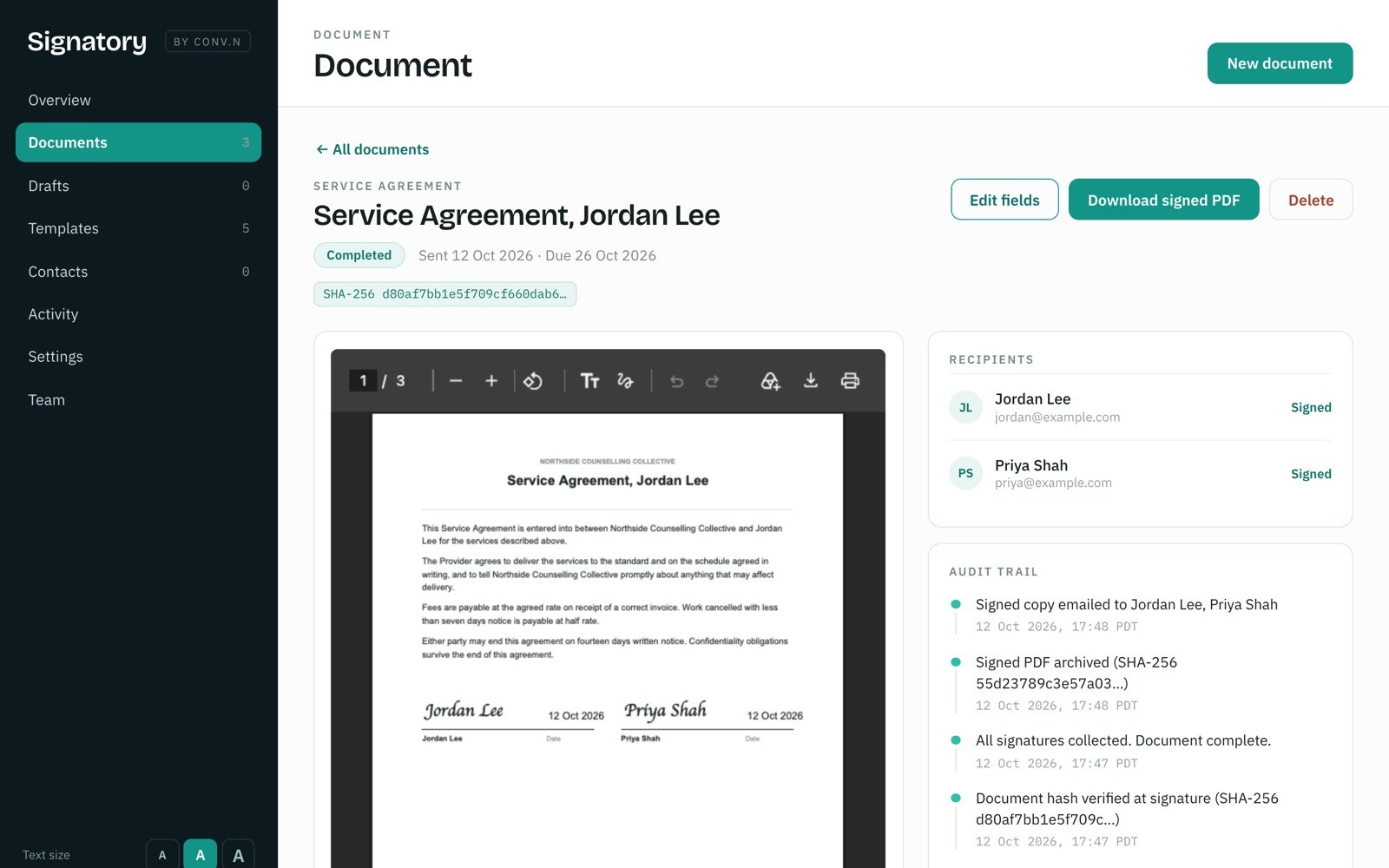
Service Agreement, Jordan Lee
- Sent to Jordan Lee, then Priya Shah
- Jordan Lee opened the document
- Jordan Lee agreed to sign electronically and signed
- Fingerprint checked. Returned to Priya Shah to countersign
From draft to signed in four steps
Start from a template, paste your own text, or upload a PDF. Signatory handles the emails, the order and the reminders.
Choose the document
Pick a template, paste text or upload a PDF, then place signature, date and text fields where they belong.
Add the people
Set who signs first and who signs next. Add yourself to countersign last, or copy someone in just to receive the result.
They sign from a link
Each person gets a private signing link by email. When one signs, the next is emailed straight away.
Everyone gets the PDF
The finished, signed PDF goes to everyone. Your copy carries a certificate listing every signature.
A record you can stand behind
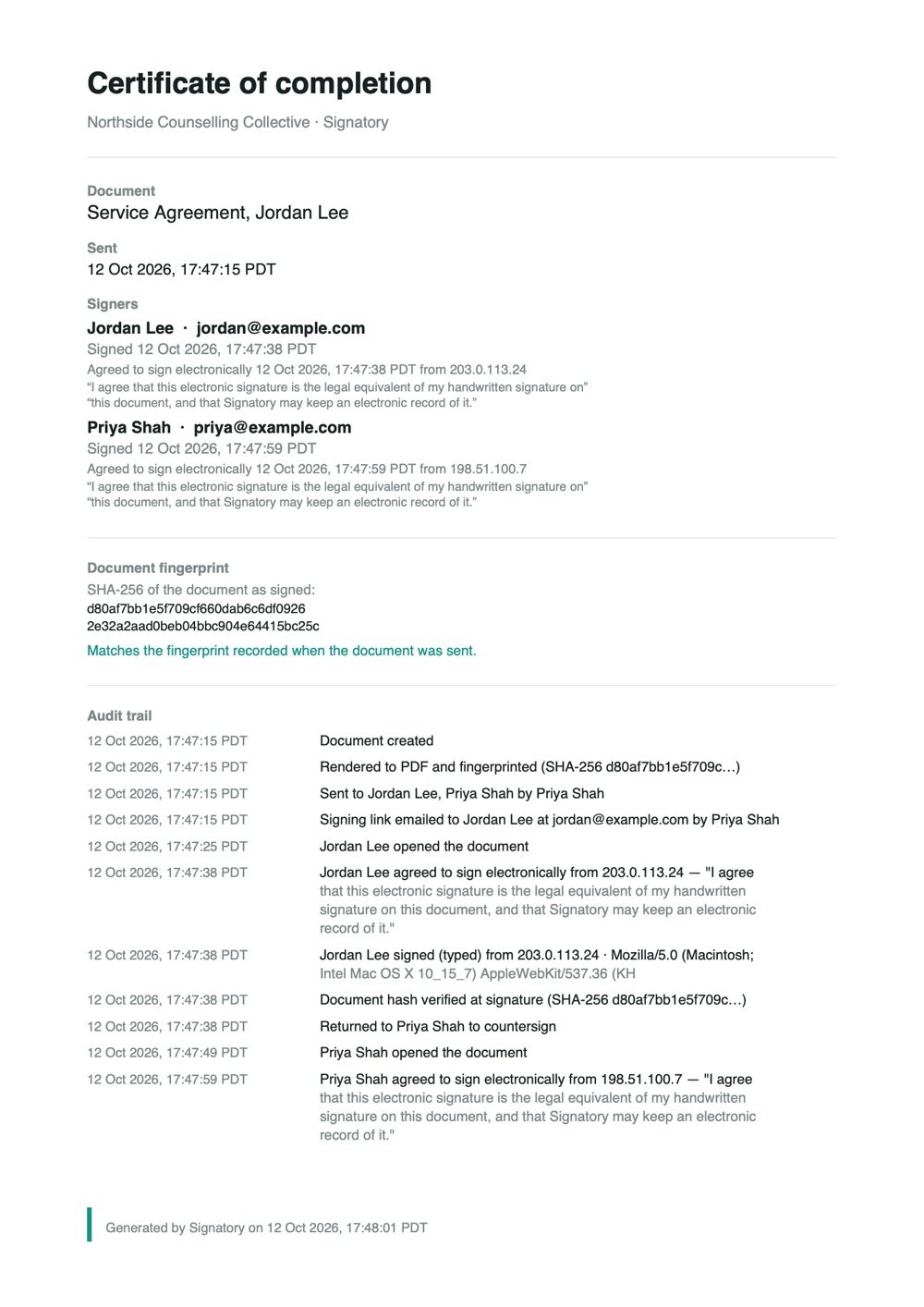
A signature is only as good as the evidence around it. Signatory writes that evidence down at the moment it happens, and keeps it.
- Consent, in the signer's own words
- Before signing, each person agrees to sign electronically. The exact wording they agreed to is saved with their signature.
- Who, when and from where
- Every opening and every signature is logged with the time, the internet address and the device used.
- Proof the document did not change
- The document's fingerprint is taken when it is sent and checked again at every signature. Any change would show on the certificate.
- Records that cannot be quietly rewritten
- Signatures and the audit trail only ever grow. A signed copy, once archived, is kept on file.
Made for the paperwork around your work
Facilitator agreements, consent forms, policy sign-offs, invoice approvals. The documents that have to be signed by the right people, in the right order, before anything else can happen.
Signing order that holds
One after another, or everyone at once. Nobody can sign out of turn, and anyone who opens their link early is told who they are waiting on.
Countersign last
Tick one box and the document comes back to you after everyone else has signed. Your signature completes it.
Reminders you don't have to send
People who have not signed are reminded on day 3, 7 and 12. Documents past their due date are flagged for you.
Templates that fill themselves in
Write an agreement once. Names, organisation and dates are filled in for each person you send it to.
One document each, in one go
Send the same agreement to a whole group, and each person gets their own copy to sign separately.
An extra lock when it matters
Add an access code you share by phone or in person, so a forwarded email is not enough to open the document.
Save and finish later
Long forms can be filled in part, closed and picked up again from the same link.
Your whole team
Give colleagues their own sign-in. The audit trail records who sent what.
Easy to read
Three text sizes, full keyboard use, and labels that screen readers announce clearly.
Simple for the people signing
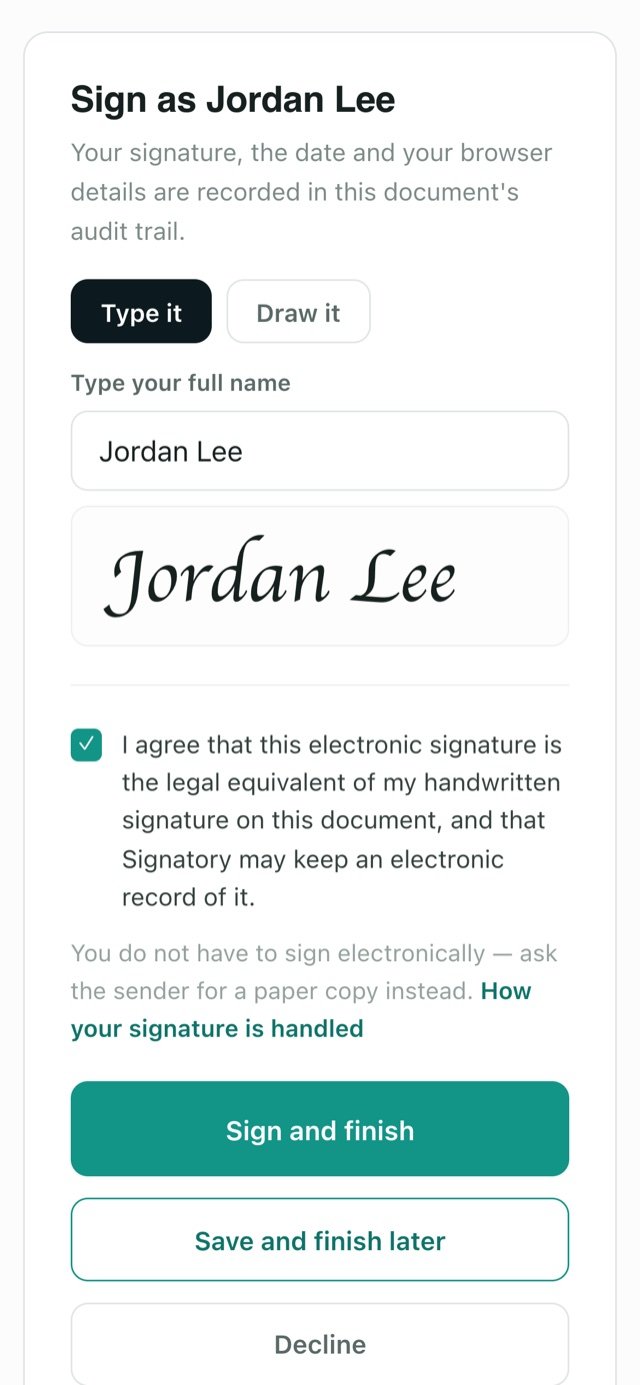
The people you send to may sign a document a year. Signatory asks nothing of them but a name and a tick.
- No account, no password. The private link in their email is all they need.
- Type or draw. They can type their name or draw a signature with a finger.
- Clear about what happens. Before signing they see who else still needs to sign and what is recorded.
- Free to say no. They can decline, or ask you for a paper copy instead.
Why Signatory exists
I built Signatory for my own facilitation team. Every training cycle meant agreements, confidentiality forms and invoice approvals, each needing the right signatures in the right order, and each needing a record we could trust later.
Now I'm opening it up to other practices, training teams and small organisations who need the same thing: documents signed properly, without the fuss.
Get early access
Signatory is opening to a small number of organisations first. Add your details and we'll write when there's a place for you.
- Your own private space for documents, templates and team
- Help moving your existing templates across
- A direct line to shape what comes next
Questions
Is an electronic signature legally valid?
In Canada, the US, the UK and the EU, an electronic signature is generally accepted for everyday agreements, as long as the signer agreed to sign electronically and there is a reliable record. Signatory records both. A few documents, such as wills and some property or family-law papers, may still need ink. If you are unsure about a particular document, check with a lawyer.
Do the people signing need an account?
No. Each person gets a private link by email. Opening it is all they need to do. Only the people sending documents sign in.
Can people sign on their phone?
Yes. The signing page is built for small screens. People can type their name or draw a signature with a finger.
Can I use my own documents?
Yes. Upload a PDF and place the signature, date and text fields where you need them, or paste your own text, or start from a template and make it yours.
What do the signers receive at the end?
Once the last person signs, everyone is emailed the finished PDF. Your copy also includes a certificate of completion with every signature, time and document fingerprint.
What happens if someone forwards their signing link?
Each link belongs to one person, and every opening is recorded. For sensitive documents, add an access code that you share separately, so the link alone is not enough. Links also expire after 45 days.
Where are documents stored?
On Signatory's own server, not on an advertising or tracking platform. Signing pages have no ads and no analytics.
How much will it cost?
Pricing will be announced before Signatory opens more widely. Everyone on the early-access list hears first.